 Import Data Templates
Imports
Import customer payments into the Business Central cash receipt journal
Receipts reported in a file, entered in the cash receipt journal and applied to their invoices in one import.
Customer payments often arrive through channels that report them in a file: a payment provider settling the month, a collection agency's remittance list, the payment service of a webshop, a list prepared by the sales team, and more. Each receipt has to be entered in the cash receipt journal and applied to the invoice it settles.
With Import Data Templates, the file becomes cash receipt journal lines in the batch you choose when the import starts. Each line carries the customer, the amount and the invoice it applies to, and the bank account is asked once when the import starts and written as the balancing account of every line.
What the file can look like
One row per receipt: the posting date, the customer, a receipt reference, the amount and the number of the posted invoice it settles. Receipts are entered with a negative amount, as in the journal; a file with positive amounts is inverted by a transformation rule. Values the file does not carry, such as the account type, the document type or the applies-to document type, are set by the template.
The sample below is the example shipped with the app. Before importing it, replace the invoice numbers with posted sales invoices of your company.
Sample file: EX-CUST-RECEIPTS.csv
- Sample file: EX-CUST-RECEIPTS.csv
How the import works
-
Load the template
Create
EX-CUST-RECEIPTSfrom the Template Examples page, or describe your own file in a template: fill it in from the structure of the file, use Read Structure from File to build it from the column headers, or let Copilot propose it from a sample file and review it before keeping it.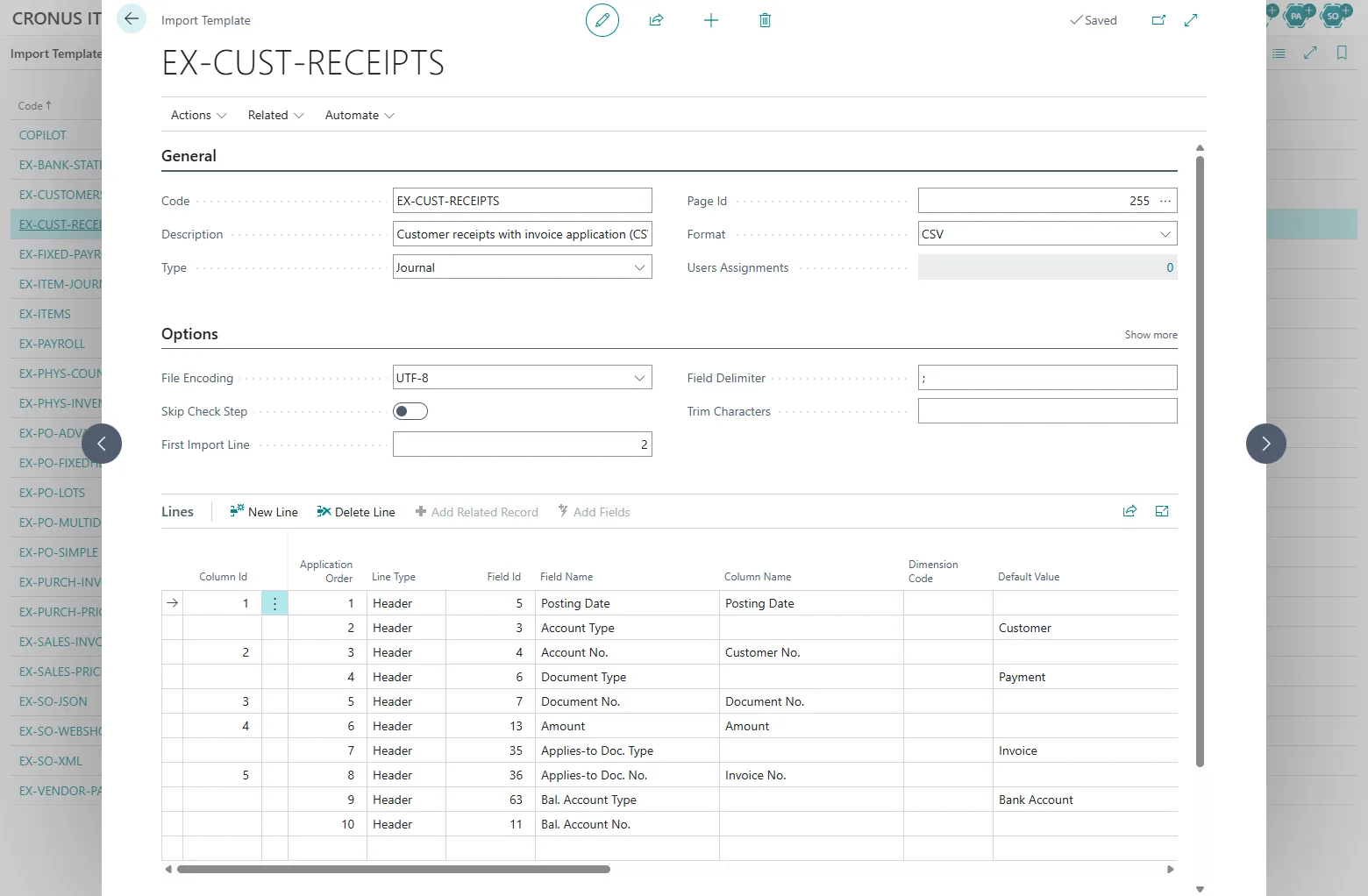
The EX-CUST-RECEIPTS template: five columns from the file, the rest set as default values. -
Start the import from the cash receipt journal
Open the Cash Receipt Journal, pick the batch, choose Import Template, then the template and the file, and select the bank account when asked. The check step validates customers, amounts and the invoices to apply to, and lists every problem with the line of the file before any line is written.
The flow on the Cash Receipt Journal: Import Template, the template, the file, the bank account. -
Review and post
The receipt lines are in the batch, each with its Applies-to Doc. No., ready to be reviewed and posted like receipts entered by hand; posting applies them to the invoices, which close when fully paid. The import history records the file, the user, the date and the number of lines created.
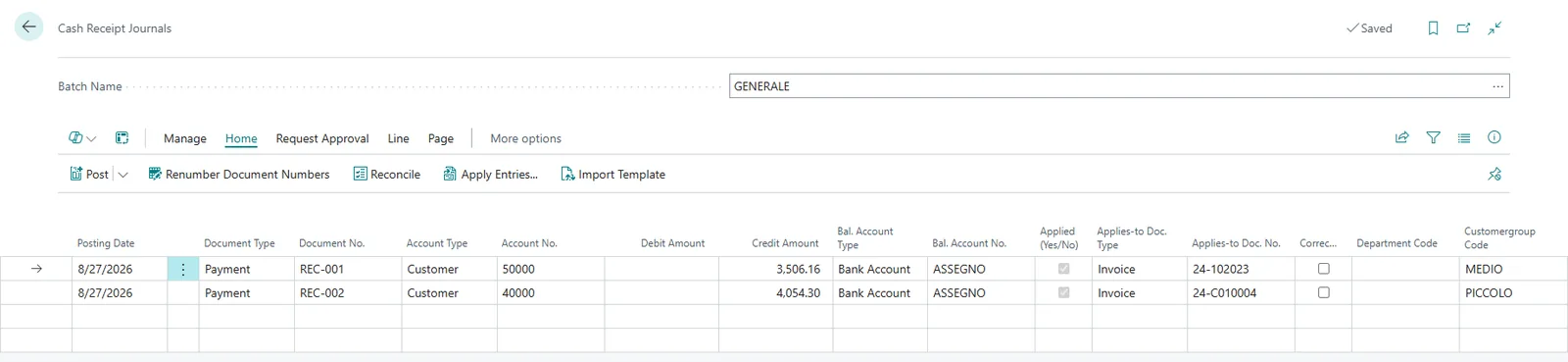
The batch after the import: each receipt balanced against the bank account and applied to its invoice.
Beyond the basic file
- The customer codes in the file are the sender's, not Business Central's: a mapping rule translates them during the import.
- Amounts arrive positive, or in cents: transformation rules invert or multiply them.
- The posting date is not in the file: an import parameter asks for it, or a default value sets it.
- The lines should be posted without a review: a line table action posts the journal at the end of the import.
- The report is written to a SharePoint, Azure Blob Storage or Azure File Share folder: the automatic imports pick it up without a user.
Receipts that reach the bank account and appear on the statement are matched in the payment reconciliation journal instead; see bank statements.
Questions
What if a receipt has no invoice number?
The line is created without an application and can be applied in the journal with Apply Entries, as for a receipt entered by hand.
Which invoice number does the file need?
The number of the posted sales invoice in Business Central, the one Applies-to Doc. No. expects.
Can one receipt settle several invoices?
Each line applies to one invoice, so a receipt that settles several invoices is written as several rows, which can share the same receipt reference.
Import Data Templates is available on Microsoft AppSource with a one-month free trial. Licenses are assigned per user in the Microsoft 365 admin center.