 Import Data Templates
Import without a user
Watched folders with a job queue, or the API for external systems and Power Automate.
Automatic imports from a folder
Templates can watch a folder: drop the files in a SharePoint, Azure Blob Storage or Azure File Share location and a job queue imports them. Each file is processed on its own, archived when it succeeds and parked with its error when it fails, and every run is recorded in the import history. A webshop that exports its orders or a bank that delivers its statements needs nobody in front of the screen.

The setup is described in the documentation.
The API
Every template can also be run through an API entity of the app, for external systems and Power Automate flows.
| Publisher | memento |
|---|---|
| API group | importTemplate |
| Version | v1.0 |
| Entity | importTemplates |
| Endpoint | https://api.businesscentral.dynamics.com/v2.0/{environment}/api/memento/importTemplate/v1.0/companies({company id})/importTemplates |
| Method | POST, authenticated like any Business Central API (Microsoft Entra ID) |
Request body
| Field | Required | Meaning |
|---|---|---|
importCode | Yes | The code of the import template to run. |
fileName | Yes | The name of the file, kept in the import history and used by duplicate prevention. |
base64FileContent | Yes | The file content in Base64, in the format the template expects (Excel, CSV, fixed length, JSON or XML; ZIP for several files). |
templateName | Journals | The journal template that receives the lines. |
batchName | Journals | The journal batch that receives the lines. |
importParameters | If the template asks for parameters | An array of objects with tableId, fieldId and fieldValue, one per import parameter of the template, for example the posting date or the price list code. |
The response carries a result field with the outcome of the import and the number of documents or journal lines created.
Power Automate
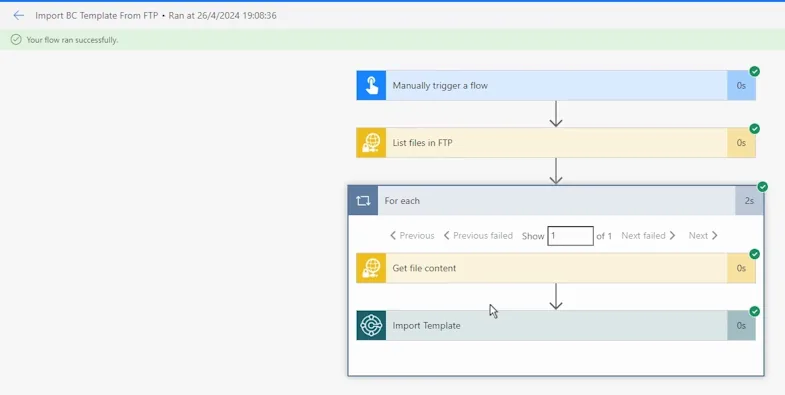
In the Business Central connector, the action to use is Create Record (V3) with the API category memento/importTemplate/v1.0 and the entity importTemplates. The file content of the trigger is passed to base64FileContent, its name to fileName. Typical triggers: a file on an FTP or SFTP server, an e-mail attachment in a shared mailbox, a record in another system.
The flow does not parse the file and does not know the layout: that stays in the template. Changing a column in the vendor's file means changing the template in Business Central, not the flow.
What runs the same way
- The check step, with the errors reported as from the page.
- Mapping rules, transformation rules, default values and import parameters.
- Template actions after the import: release documents, post journal lines, replace and activate prices, match bank payments.
- Import history and duplicate file prevention.
The API page of the documentation shows the request, the response and a Power Automate flow reading files from an FTP server, step by step.
Import Data Templates is available on Microsoft AppSource with a one-month free trial. Licenses are assigned per user in the Microsoft 365 admin center.